
 Threedy Documentation Portal
instant3Dhub on Azure (AKS)#
Read First#
This guide describes only what is different or additional on AKS. Anything that is not Azure-specific is not repeated here:
Node sizing, volume sizes, licensing and image registry: instant3Dhub requirements
Image transfer, Helm channels and the installation itself: instant3Dhub on Kubernetes
Terminating HTTPS in front of the cluster: proxy guide
Using a database outside the cluster: external PostgreSQL
This page assumes an AKS cluster already exists.
Azure reference architecture#
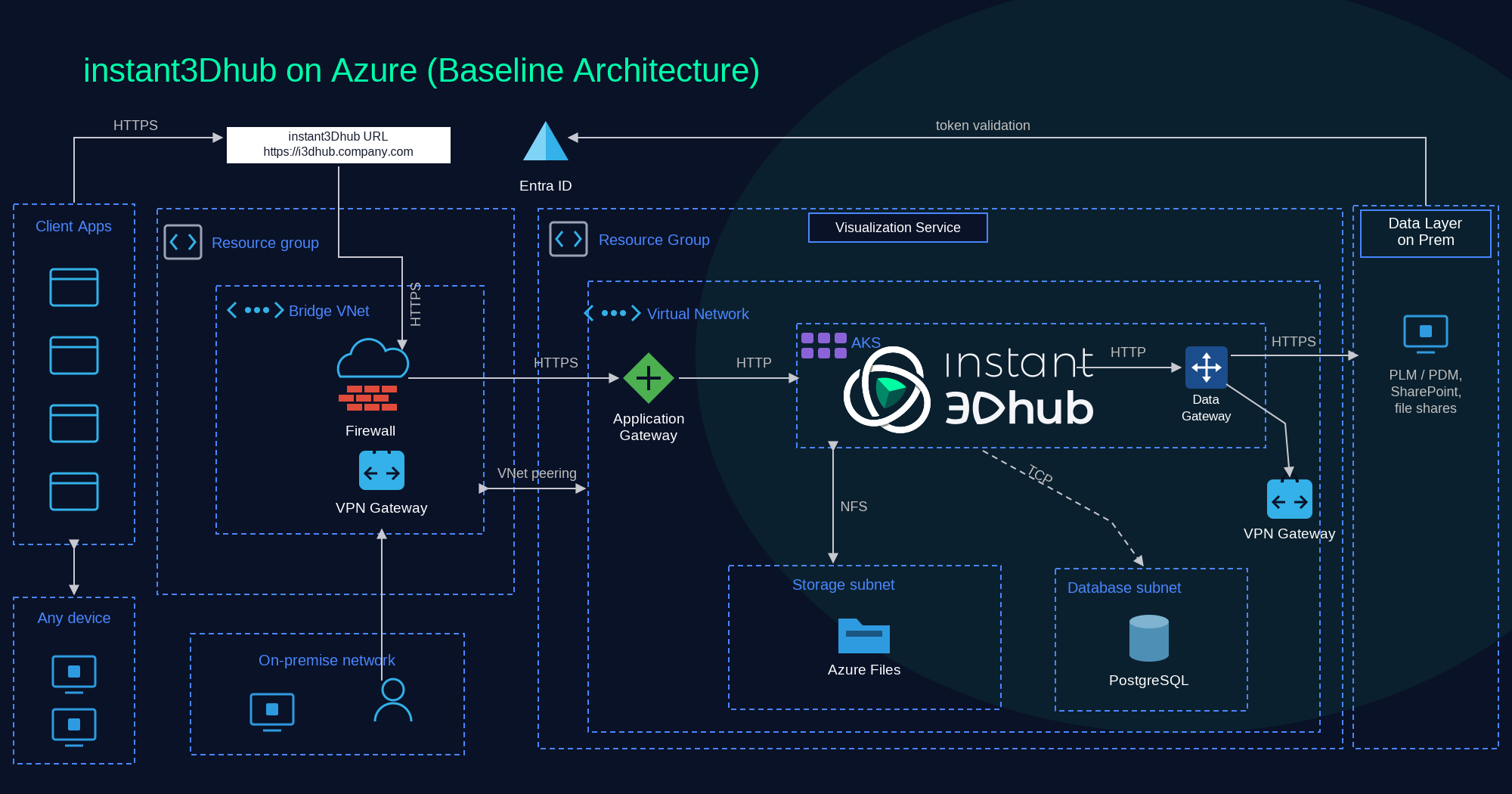
A reference deployment on Azure. Not every element is required: the bridge resource group, the VPN gateways and the identity provider depend on the environment, and the data layer holds whichever systems the data gateways read from.#
The virtual network around AKS is what this guide covers. Traffic enters through the Application Gateway, which terminates TLS, and reaches the services on AKS. Those services hold their state on Azure Files and Azure Disk, described under Storage, and reach the data layer through the data gateways.
Prerequisites#
Most of the items below cannot be created by a project team alone. Requesting them in one go avoids repeated rounds with the cloud administration.
Request from the cloud administration#
AKS cluster with Azure CNI and a Standard Load Balancer.
Node pool matching the recommended node specification, for example
Standard_D16as_v4(16 vCPU / 64 GB).An explicit
max_podsvalue on the node pool. With Azure CNI the default limits a node to 30 pods, which instant3Dhub exceeds on small clusters.A Premium FileStorage storage account with large file shares enabled and secure transfer required disabled. This account carries the
ReadWriteManyvolumes over NFS, and NFS shares offer no TLS, so the transfer setting must be off or mounting fails.Network access from the cluster to that storage account: default action Deny, plus a
Microsoft.Storageservice endpoint on the AKS subnet. The share is reached over the virtual network rather than by access key.Role assignments for the cluster and kubelet identities on the storage account, and Network Contributor for the cluster identity on the subnet, so the CSI driver can mount and manage shares.
Outbound access to
images.threedy.io,license-manager.threedy.ioandrepo.threedy.io, or to a custom mirror. For air-gapped environments see the License Server instead.A DNS name and a TLS certificate for the entry point. HTTPS is not supported inside the cluster, so it is always terminated in front of it.
A GPU node pool (NC-series), only if GPU-backed services are used.
Install on the cluster#
Azure Files CSI driver (
file.csi.azure.com) for theReadWriteManyvolumes. Enabled by default on AKS.Azure Disk CSI driver (
disk.csi.azure.com) for theReadWriteOncevolumes. Provides the defaultmanaged-csistorage class.An ingress that terminates TLS, either the Application Gateway ingress controller add-on or
ingress-nginx.NVIDIA GPU Operator, only when a GPU node pool is used.
Storage#
instant3Dhub needs both access modes at the same time, and no single Azure
storage class serves both. Azure Files provides ReadWriteMany, Azure Disk
provides ReadWriteOnce at much better latency.
Volume |
Access mode |
Azure storage |
cache_volume |
RWX |
Azure Files (NFS) |
entrygw_volume |
RWX |
Azure Files (NFS) |
upload_volume |
RWX |
Azure Files (NFS) |
postgres_volume |
RWO |
Azure Disk ( |
rabbitmq_volume |
RWO |
Azure Disk ( |
prometheus_volume |
RWO |
Azure Disk ( |
jaeger_volume |
RWO |
Azure Disk ( |
Warning
Do not place postgres_volume or rabbitmq_volume on an SMB Azure Files
share. SMB shares provide no hard links, which PostgreSQL and RabbitMQ
require. Use Azure Disk for the ReadWriteOnce volumes.
Storage class for the ReadWriteMany volumes#
Replace the storage account name and its resource group with those of the account requested from the cloud administration. Without them, the CSI driver creates a storage account of its own in the node resource group, which bypasses the network rules and role assignments listed under Prerequisites:
apiVersion: storage.k8s.io/v1
kind: StorageClass
metadata:
  name: azurefile-csi-nfs
provisioner: file.csi.azure.com
reclaimPolicy: Delete
allowVolumeExpansion: true
parameters:
  protocol: nfs
  skuName: Premium_LRS
  resourceGroup: <storage-account-resource-group>
  storageAccount: <storage-account-name>
mountOptions:
  - nconnect=4
  - actimeo=30
  - noresvport
The ReadWriteOnce volumes use the managed-csi class that AKS creates by
default, so no additional storage class is required for them.
Assigning both classes#
The chart resolves a storage class per access mode. Both options fall back to
storage.class when unset, and are available since instant3Dhub 3.11.0:
Value |
Applies to |
|
cache, entrygw and upload volumes |
|
postgres, rabbitmq, prometheus and jaeger volumes, plus the VictoriaLogs volume when integrated VictoriaLogs is enabled |
Note
Setting only storage.class points every volume at one class. On Azure that
either fails for the ReadWriteMany volumes or puts the database on a file
share. Set both values instead.
Install#
helm install [release-name] instant3dhub/instant3dhub \
  --set license.serialKey=key-here \
  --set storage.readWriteManyClass=azurefile-csi-nfs \
  --set storage.readWriteOnceClass=managed-csi \
  --set entrypoints={https://hub.yourdomain.com} \
  --set registry=registry.yourdomain.com
entrypoints must carry the address at which the system is reached from
outside, which is the ingress or Application Gateway address, not a
cluster-internal one.
External PostgreSQL#
Azure Database for PostgreSQL Flexible Server meets the version requirement of PostgreSQL v13 or later.
Note
This combination has not been verified by Threedy. If this option is used, the
requirements in the external PostgreSQL guide
apply unchanged, including the UTF-8 database, a user allowed to create tables
and functions, and the sslmode handling. Flexible Server enforces TLS, so
the connection string needs sslmode=require and the Azure certificate
authority has to be supplied through security.customCAs.
Known pitfalls#
Pods stay Pending on a fresh node pool.
With Azure CNI a node accepts 30 pods unless max_pods was set when the pool
was created. The value cannot be changed afterwards; the pool has to be
recreated.
ReadWriteMany claims stay Pending.
Either the storage class points at an SMB share instead of NFS, or the storage
account is not reachable from the AKS subnet. Check that the
Microsoft.Storage service endpoint exists on the subnet and that the subnet
is allowed on the storage account.
NFS mounts fail on a correctly configured share. Secure transfer required is still enabled on the storage account. NFS cannot satisfy it and the mount is refused.
GitOps#
Note
Installing instant3Dhub through Flux is not tested. Threedy has no
in-house Flux deployment to validate against. Installing the chart through a
Flux HelmRelease is expected to work, but the values above are the only
ones we verify. If you run instant3Dhub under Flux and hit problems, please
report them through our ServiceDesk.