
 Threedy Documentation Portal
instant3Dhub on AWS (EKS)#
Read First#
This guide describes only what is different or additional on EKS. Anything that is not AWS-specific is not repeated here:
Node sizing, volume sizes, licensing and image registry: instant3Dhub requirements
Image transfer, Helm channels and the installation itself: instant3Dhub on Kubernetes
Terminating HTTPS in front of the cluster: proxy guide
Using a database outside the cluster: external PostgreSQL
This page assumes an EKS cluster already exists.
AWS reference architecture#
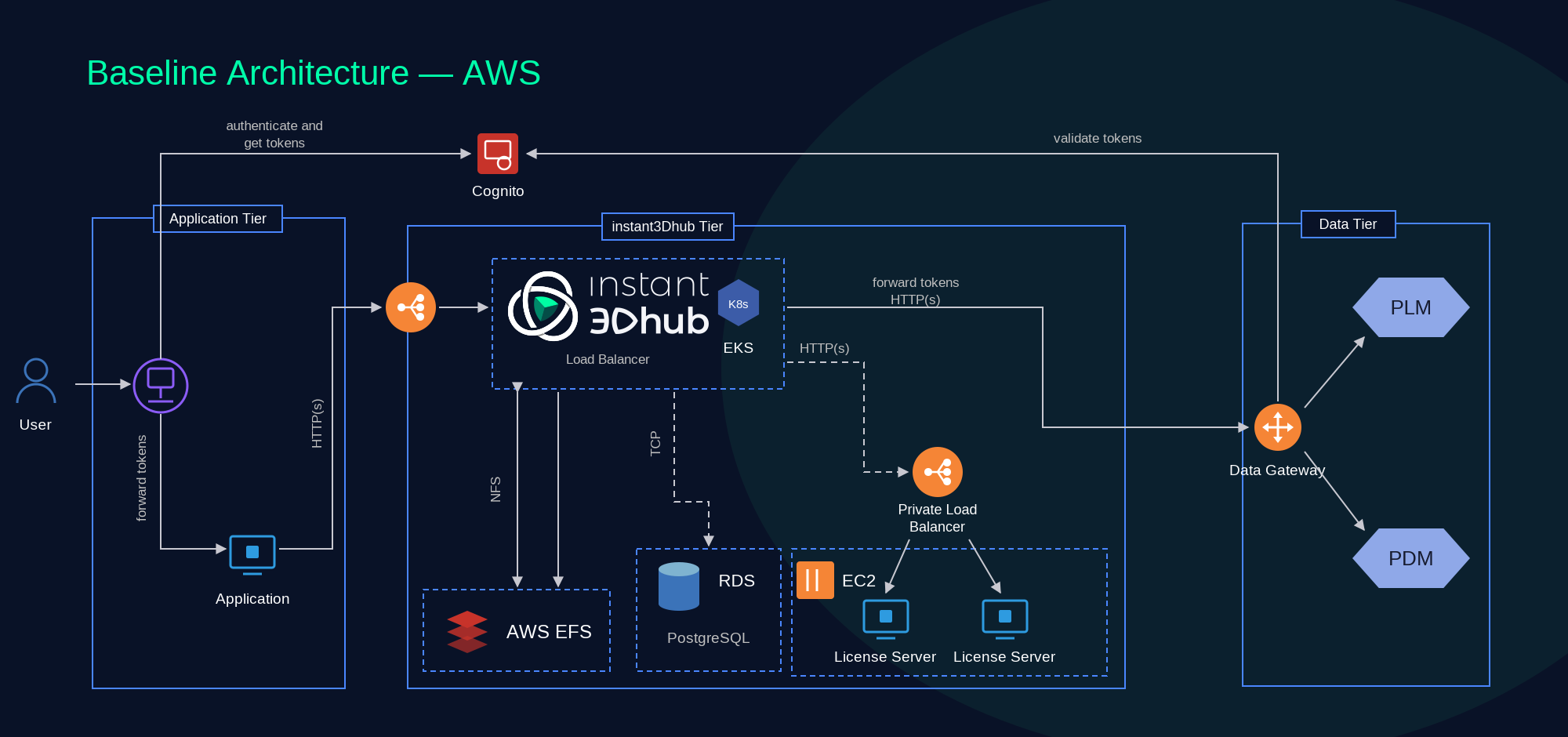
A reference deployment on AWS. Not every element is required: the identity provider, the private load balancer and the License Servers on EC2 depend on the environment, and the data tier holds whichever systems the data gateways read from.#
The instant3Dhub tier is what this guide covers. Traffic enters through a load balancer, which terminates HTTPS, and reaches the services on EKS. Those services hold their state on EFS and EBS, described under Storage, and reach the data tier through the data gateways.
Prerequisites#
Most of the items below cannot be created by a project team alone. Requesting them in one go avoids repeated rounds with the cloud administration.
Request from the cloud administration#
EKS cluster with an IAM OIDC identity provider enabled. The storage and load balancer controllers authenticate through IAM roles for service accounts, which does not work without it.
Node group matching the recommended node specification (16 vCPU / 64 GB).
Permission to create IAM policies and roles, or the finished roles for the EFS CSI driver and the AWS Load Balancer Controller.
An EFS file system in the cluster VPC, with a mount target in every subnet that runs nodes. This carries the
ReadWriteManyvolumes, and a subnet without a mount target cannot mount it.An inbound rule on the security group of the EFS mount targets allowing NFS (TCP 2049) from the node security group. Without it the volumes bind but never mount.
Outbound access to
images.threedy.io,license-manager.threedy.ioandrepo.threedy.io, or to a custom mirror. For air-gapped environments see the License Server instead.A DNS name and an ACM certificate for the entry point. HTTPS is not supported inside the cluster, so it is always terminated at the load balancer.
A GPU node group using an EKS optimized accelerated AMI, only if GPU-backed services are used. Check the account vCPU quota for the chosen instance family before requesting it.
Install on the cluster#
EFS CSI driver (
efs.csi.aws.com) for theReadWriteManyvolumes, together with its IAM policy and a service account annotated with the matching role.EBS CSI driver (
ebs.csi.aws.com) for theReadWriteOncevolumes, available as an EKS add-on.AWS Load Balancer Controller, to expose the API gateway through an NLB or an ALB instead of a node port.
NVIDIA device plugin or GPU Operator, only when a GPU node group is used.
Storage#
instant3Dhub needs both access modes at the same time, and no single AWS storage
class serves both. EFS provides ReadWriteMany, EBS provides
ReadWriteOnce at much better latency and lower cost.
Volume |
Access mode |
AWS storage |
cache_volume |
RWX |
EFS |
entrygw_volume |
RWX |
EFS |
upload_volume |
RWX |
EFS |
postgres_volume |
RWO |
EBS (gp3) |
rabbitmq_volume |
RWO |
EBS (gp3) |
prometheus_volume |
RWO |
EBS (gp3) |
jaeger_volume |
RWO |
EBS (gp3) |
Warning
Older internal examples place every volume on EFS. Do not follow them.
PostgreSQL on EFS performs poorly, and the access point then has to be owned
by the PostgreSQL user, which is why those examples override uid and
gid. Putting the ReadWriteOnce volumes on EBS removes that problem.
Storage classes#
Replace the file system ID with that of your EFS file system:
apiVersion: storage.k8s.io/v1
kind: StorageClass
metadata:
  name: efs-sc
provisioner: efs.csi.aws.com
parameters:
  provisioningMode: efs-ap
  fileSystemId: fs-xxxxxxxxxxxx
  directoryPerms: "700"
mountOptions:
  - tls
---
apiVersion: storage.k8s.io/v1
kind: StorageClass
metadata:
  name: ebs-gp3
provisioner: ebs.csi.aws.com
reclaimPolicy: Delete
allowVolumeExpansion: true
volumeBindingMode: WaitForFirstConsumer
parameters:
  type: gp3
Note
volumeBindingMode: WaitForFirstConsumer matters on EBS. An EBS volume
exists in one availability zone, so binding it before the pod is scheduled can
place it in a zone where the pod cannot run.
Assigning both classes#
The chart resolves a storage class per access mode. Both options fall back to
storage.class when unset, and are available since instant3Dhub 3.11.0:
Value |
Applies to |
|
cache, entrygw and upload volumes |
|
postgres, rabbitmq, prometheus and jaeger volumes, plus the VictoriaLogs volume when integrated VictoriaLogs is enabled |
Note
Setting only storage.class points every volume at one class. On AWS that
either fails for the ReadWriteMany volumes or puts the database on EFS.
Set both values instead.
Install#
helm install [release-name] instant3dhub/instant3dhub \
  --set license.serialKey=key-here \
  --set storage.readWriteManyClass=efs-sc \
  --set storage.readWriteOnceClass=ebs-gp3 \
  --set entrypoints={https://hub.yourdomain.com} \
  --set registry=registry.yourdomain.com
entrypoints must carry the address at which the system is reached from
outside, which is the load balancer or ingress address, not a cluster-internal
one.
External PostgreSQL#
Amazon RDS for PostgreSQL and Aurora PostgreSQL meet the version requirement of PostgreSQL v13 or later.
Note
Neither combination has been verified by Threedy. If one is used, the
requirements in the external PostgreSQL guide
apply unchanged, including the UTF-8 database, a user allowed to create tables
and functions, and the sslmode handling. When TLS verification is
enforced, supply the Amazon certificate authority through
security.customCAs.
Known pitfalls#
Nodes do not join the cluster or have no pod networking.
The node group role is missing AmazonEKS_CNI_Policy. Attach it to the role
used by the node group.
GPU pods fail with Failed to initialize NVML: could not load NVML library.
The node group uses a default AMI. GPU nodes need an EKS optimized accelerated
AMI, selected per Kubernetes version from the EKS documentation.
GPU nodes never start. The account vCPU quota for the requested instance family is exhausted. Quotas for GPU families are low by default and have to be raised explicitly.
ReadWriteMany claims stay Pending. The service account of the EFS CSI driver is not annotated with a role that allows access, so the driver cannot create the access point for the claim.
Pods stay in ContainerCreating with an EFS mount timeout. The claim binds, but the node cannot reach the file system. Either the security group of the EFS mount targets does not allow inbound TCP 2049 from the nodes, or the EFS file system has no mount target in the subnet where the pod is scheduled. Because the claim binds regardless, the volume looks healthy.
GitOps#
Note
Installing instant3Dhub through Flux is not tested. Threedy has no
in-house Flux deployment to validate against. Installing the chart through a
Flux HelmRelease is expected to work, but the values above are the only
ones we verify. If you run instant3Dhub under Flux and hit problems, please
report them through our ServiceDesk.