Interactive Assembly Guide#

Who this is for: Manufacturing Engineering Technical Documentation Assembly Technical author Assembly worker
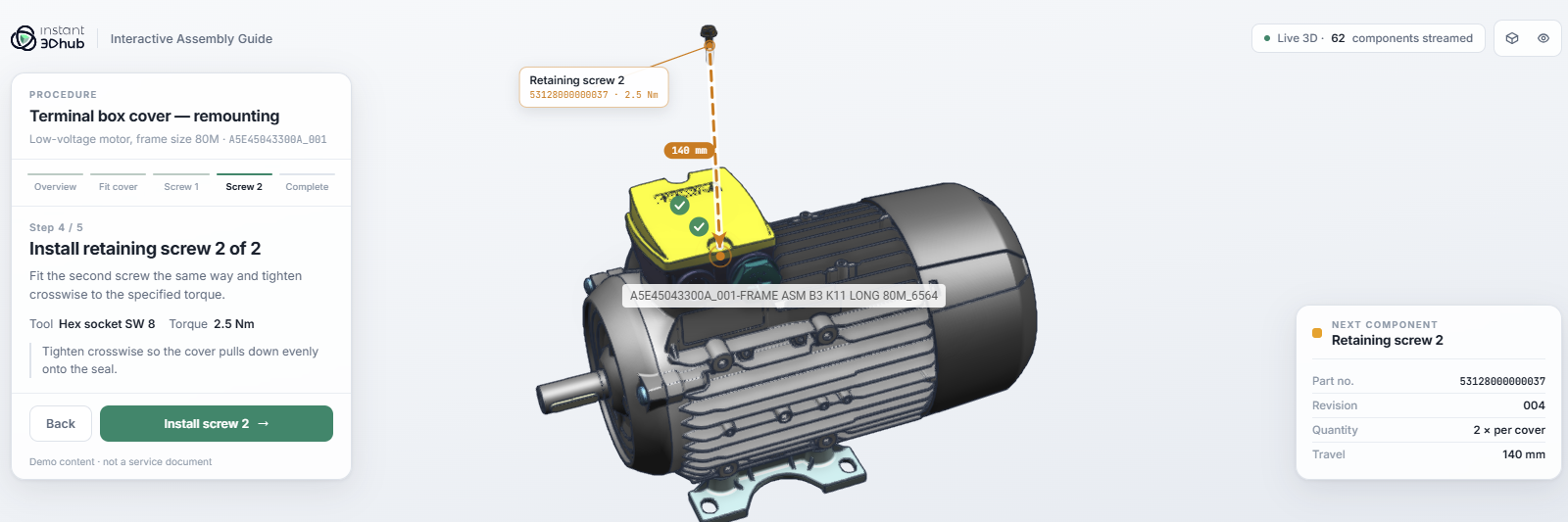
An assembly step shown in 3D, with the component to fit highlighted and an arrow to its mounting position

An assembly bench with high variant count, assembled by people. Every variant needs its own sequence, and every sequence its own instruction.

Today that instruction is rebuilt outside the CAD data: screenshots taken by hand, arrows drawn on top, printed sheets at the bench - and re-shot whenever the part changes.

With instant3Dhub the instruction is built directly in the released 3D assembly: authored once in the 3D scene, carried out at the station, refreshed with the revision.

Key features involved, step by step#

1. Manufacturing engineering defines the assembly sequence

Every variant gets its own sequence, built on the released CAD data.

Data Gateway
Data Gateway Data Gateway

Pulls the released assembly directly from the connected source system, such as Teamcenter, Windchill, or SAP.

Dynamic Composition
Dynamic Composition Dynamic Composition

Assembles the exact variant a station builds, without a separate model per variant.

2. The technical author writes the step

The instruction is authored once, in the 3D scene instead of on screenshots.

Snapshots
Snapshots Snapshots

Stores each step as a restorable viewpoint and scene state, instead of a screenshot of it.

Annotation
Annotation Annotation

Attaches the instruction text, torque value and tool to the component they apply to.

3. The instruction is reviewed and released

The instruction is checked in 3D before it goes to the line.

Live Collaboration
Live Collaboration Live Collaboration

Puts the technical author, manufacturing engineering and quality in the same 3DSpace to review the instruction before it is released.

Drawing
Drawing Drawing

Lets reviewers sketch their comments directly in the 3DSpace, next to the part they concern.

4. The assembly worker carries out the step at the station

The worker follows the instruction at the bench, one step at a time.

Transform
Transform Transform

Moves the component from where it comes from to where it is mounted, so the worker sees the mounting direction as a movement of the real part.